Tuesday, May 28, 2013

Cooking with Monkey Brains

Hailing back to when I went to University and had the first taste of cable TV + internet, its since been a steady fixture in every house I'd lived in. Whilst the cost has gone up however, I often feel that nothing much has changed since the 90's apart from my growing apathy towards paying through the nose for what must be considered a basic service these days.

So our household recently cut the cable cord for the first time *.

(*although technically, back when we lived above City Beer Store, the building had Webpass microwave internet installed as well as cable - 100Mbs up/down!).


UI, UI, UI

One of my biggest issues with cable TV was, and still is the UI. Not only is it slow (a quick shout out to Virgin Media in the UK, who I actually had to round to my house in 2003 because I thought that the box was broken or misconfigured, such was the sluggishness in the interface) but its full of formatting issues, dumb questions and has a navigation speed 2 knots below a slow boat to China.

Image curtesy of http://unixjunkie.blogspot.com/2007/10/i-am-certainly-no-ui-guru-favorite-ui.html

Much has been written about this over the years, yet in 2013, the only selection of cable boxes I could get in my postcode (a fairly mainstream area of San Francisco) still has this 'classic' design. And they ask over 120 bucks a month for this!!


MONKEY BRAINS ISP - SAN FRANCISCO

Monkey Brains is an ISP in San Francisco that supplies the internet to your home, via a dish on your roof. Its very much a local company, only handling business and residential connections in the city and even then, in select areas.


The dish they installed on my house is the Ubiquiti Nanobridge M5 (datasheet here). This uses a 5GHz channel (line of sight) running a proprietary protocol (AirMax TDMA), pointing to a concentrator node that sits on the MB backbone.


The install cost is 250$ which seems reasonable (the kit itself costs ~100$ and there is a free month of service thrown in).


PING AND BANDWIDTH

I have been known to obsess about the odd game now and then, and one thing we all know is that a lower the ping you have, the better the online player you are :) Running a few speed tests over the wire late at night, I got the following:

Running speed test from idle:


During netflix streaming (to the XBox):


This seems perfectly acceptable, although the upload speed is a little disappointing  However, there are a few characteristics of the link that are not great:


  • During peak hours, ping can jump to 300ms+ and downlink below 4Mbs
  • There appears to be either a QoS or bandwidth reservation process going on that causes some streaming sites to stutter when starting up  (again, during peak hours). When established however, they work fine. Youtube is particularly bad here for some reason, often falling back to poor quality stream before it recovers.


Still, for 35$ a month, I have been happy with the service so far.


MICROWAVE POWER

The wife, whose input about the dish on our roof was still a popular topic in the house, had one additional interesting observation, namely that of the title of the wireless provider:

- "Will our 6 month old son be affected by the addition microwave output? Is this why they called it monkey brains?!"

Reading up on the topic, the output from this seems to be equivalent to 3 mobile phones, but highly directional and as long as you don't sunbathe in front of it, there is nothing to be worried about.

But I tried to cook my dinner on it anyway (Bavarian Bratwurst - very tasty).

After 30 mins, the sausage hadn't cooked.

Last word - apologies to our next door neighbors for hiding behind my balcony after I heard your kids shouting something about "fishing". You really didn't need to see a man standing in the rain with a baseball bat, cooking a sausage on his 'satellite dish'. 

Sunday, May 12, 2013

ApplyPy


Back when I was at school, just when the BBC Micro was busy making a big splash as the hottest new computer to penetrate the school system, Staffordshire Education Authority were busy purchasing computers from a company called Research Machines. These guys had a competing 8bit micro on the market in the early 80's called the 480z.


This wasn't just a standalone computer however (although it could boot off 5 1/4" floppy disks), our schools installation booted off the network and could share files / programs with other users.

During the fabulous early IT education in the UK that was concerned with mice and thermal printers, a wondering mind would sit in the computer lab, experimenting with the network and its various secrets. After writing a chat program in pascal to allowed the class to communicate with each other (some mischief did surprisingly occur), I fell over the game of games, RobotWar.

This game quickly turned into the ultimate programming competition amongst a few friends. Many lunchtimes were spent hiding in the lab, coding up robots (it used a BASIC like language) and fighting battles against each other. Fond memories, which on recent recollection gave me a hankering to dig this game up.

As 480z machines were never popular enough outside the education market to be emulated in these modern times, the only version I could find was for the Apple ][ , stored as a WAV recording of the original cassette tape. I found what looked like an interesting emulator for the Apple ][ and downloaded it, ready to run through a few rounds of the game and then retire to bed. But the emulator didn't support the cassette HW (or disk).


APPLEPY

Instead of grabbing another emulator, I took a quick look at the the src to ApplePy, written in (sic) python. The basics of the emulator are pretty neatly put together.

  • cpu6502.py - a model of the 6502  processor including the instruction set and the bus (basic ROM and RAM models included)
  • applepy_curses.py (or simply applypy.py) - the front end to the emulator that uses the curses API or pygame module to visualize the display

The cpu6502 module runs as a separate process in the ApplePy emulator. Note that this module is not a direct proxy for an Apple computer as a whole, but more an abstract just representing the CPU complex and bus of a MOS Technology 6502. It does however hardcode the location of the RAM (0x0000 - 0x2000) + ROM (0xD000 - 0xFFFF) available in the design to the locations used by the Apple ][ , where in reality the processor is agnostic of the allocation of the address ranges.


The display, keyboard and other peripherals that make up the Apple ][ hardware live in the applypy_curses.py OR applepy.py files (depending if you want a ncurses based display or something that uses pygame). These peripherals simply accept in read or write bus requests for data and either output to the display or read from a keyboard peripheral. However, as these are in a different process, the 2 python modules need communicate via a socket that is established when the cpu6502.py is spawned. This protocol uses a simple character based message passing protocol for the CPU to request bus read / writes from the remote process.


TAPE INTERFACE

The Apple II tape interface was pretty much an in sourcing of the Apple I external cassette adapter or ACI. The original Apple 1 cassette interface was mapped directly onto the 16k internal bus from the 6502 processor (same method as the display / keyboard peripherals) and consisted of 2 main parts:

  • 256bytes of ROM (routines to read / write to the tape)
  • Analog to digital HW to sample in the cassette signals

You would install the Apple 1 ACI interface to your nice and new Apple computer, boot the system and then jump to 0xC100 (where the ROM for the cassette interface was mapped) and it would take over reading in the tape contents to another location in memory. The ROM actually implemented a very basic cmd line to specify where to load the contents of the tape to (tapes usually shipped with instructions about how much memory was needed and the loading instructions).

In the Apple ][ however, the tape ROM was mopped up into the main monitor ROM and so you could simply read or write from the main monitor shell.

There is a great walk through of the physical tape interface and the Apple 1 ROM internals here - fitting in the code for the tape interface into 256 bytes of ROM was an amazing bit of coding and working through it, I came out with a lot of admiration for +Steve Wozniak.

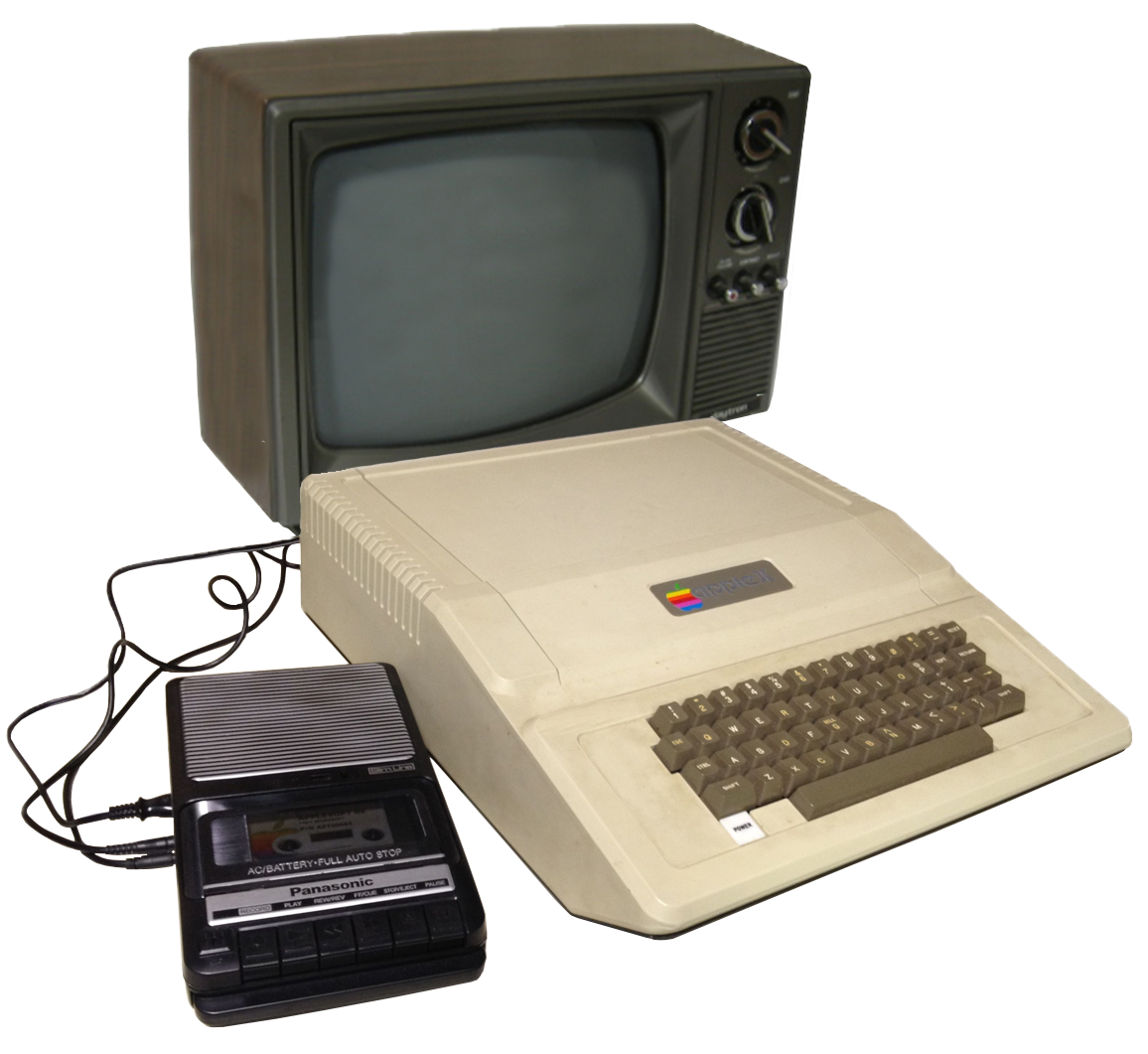
Apple II, Panasonic RQ-2102 cassette, and TV - Photo credit: Carl Knoblock, Phil Pfeiffer

WHERE IS THIS GOING!

So, I modified the ApplyPy to support the cassette interface and in the process, had to write a great little hack to 'clean up' recordings of Apple cassette tapes. But its late, so I'll save writing this up for tomorrow.

Saturday, May 11, 2013

Photo Laser Confinement Grid

When Ghostbusters came out, I was always fascinated by the containment unit. It wasn't anything to do with how it worked (storing ghosts is clearly a complicated issue), but the user interface to it:

  • Capture a ghost in a single foot press
  • Take it back to HQ
  • Upload to the ghost storage unit by plugging in the trap

This was great - no selecting which directory to store a ghost in, a 10 second operation and some bonus levers to manipulate for satisfaction  Overly dramatic green and red lights and a zoning issue with the city really sealed the deal here. A quick training video from Ray:


The 2 button presses however? Meh.

Anyway, after I regained the usage of my NAS box for more traditional activities, the problem of managing all my photos was back on the cards. Also, the wife had started deleting photos 'on the camera' to make room for more cute baby pictures which is the kind of thing that keeps me awake at night, so action was needed.


PHOTO CONTAINMENT UNIT

My photo storage policy is pretty easy:

  • Store locally at home
  • Store in the cloud
  • Store randomly on a bunch of SDCards hanging around the house 

Clearly the card issue needs to be solved, although I am pretty sure I have them all... :) The home and cloud storage are just reflections of a good backup solution. Also the NAS ate a drive and is not to be trusted anymore.

However, all of this is maintained manually. What I really want is a photo containment unit that operates like this:

  • Capture photos on my camera
  • Take camera back home
  • Put camera card into photo containment unit and wait for the light to turn green

The storage here is automatic replication to the local RAID disks and Google Drive.

So I put one together this evening.


READY NAS PHOTO BOX

My NAS has a USB input on the front.


Plugging in an SDCard from my SLR into the front of this triggers a python script that copies off the new files to the disk. Then it triggers a sync to Google Drive.

Photo organization after upload is still done manually by viewing the files in a thumbnail mode and dragging them into new directories based on the topic. But I do this on a laptop which auto sync's with Google Drive and then updates both the cloud and NAS storage locations for the files. I thought about storing the files by date or even coarse GPS area, but I like to manually sort and prune out bad images etc... so I left it fairly basic.


GOOGLE DRIVE INTEGRATION

A great open src project, Grive is one of the few ways to sync files from a local Linux box to Google Drive without a UI.

https://github.com/Grive/grive

Cross compiling this onto the ReadyNAS (actually on the NAS itself) was a little bit of a mission however. The box is based on a SPARC LEON  derivative, a 280 Mhz processor from a company that used to exist called Infrant. Netgear bought this 34 person company back when they were building these SPARC based processors, moving them over to more standard and supportable ARM cores after acquisition.

Anyway, getting the ReadyNAS to cross compile Grive was an adventure that might be more difficult to  submit a pull request its github than reimplementing the calls to Boost . Shame really as I always liked Boost (well, in comparison to GCC implementation).


PYTHON TIME AND THE GITS

Of all the hacking I did on the ReadyNAS to make this work, the only real tangible piece of code is a 5 minute script knocked up that runs when an SDCard is inserted into the NAS box (triggered by the disk mounting).

The python script does the following:

  • Take in 3 paths
    • Photo storage directory
    • Memory card directory
    • Staging directory to copy the files to from the card (optional, if not specified it does not copy)
  • Create a list of all the files in the storage and memory card paths
    • Use the filename and size as a key
      • Adding in the date doesn't help as this gets reset on Windows when copying files around... I was guilty of this at one time. Joy.
  • Create list of files not on the photo storage disk but are on the memory card
    • Optionally dump to stdout
    • Copy these files to the staging directory (if specified)
      • When copying the file, keep the date the same from the memory card
  • Conflicts (where multiple files of the same name and size exist either on the photo disk or memory card)
    • Checksum the files and match away any pairs that exist automatically
      • Optionally dump to stdout
      • Side benefit of this is that is finds duplicates on the photo storage disk as well
    • Print out any remaining conflicts to stdout for manual fix ups
      • Copies these duplicates to a conflicts directory in the staging area


KODAK DC240i

I have a remaining issue, that of duplicate files on my photo storage disk that have different resolution / sizes. This was caused by an overzealous camera (I believe this was a Kodak DC240i, bought in fetching iMac blue when I got my first pay cheque after clearing my student loans).


This camera used to store a smaller thumbnail picture alongside the main image (which was only 1.3MP). At the time, JPEG decoding was very slow on a PC and navigating 'hundreds' of pictures was a real pain, so this was actually a pretty useful feature. 

I also pondered if this was done to enable the camera to navigate the captured images as well. This camera used the TI SoC as the main processor, based on a ARM7 at 80 MHz. There is a DSP also running at the same clock speed, which looks to be dedicated to audio input/output and the main event, a 90MHz SIMD processor for the ISP + JPEG encode/decode (not clear where the huffman decode/encode is done however). Back of a napkin suggests a JPEG decode speed (scaler CPU for huffman, 4 way vector DCT in the image accelerator) should be easily capable of 'good enough' full size JPEG decode for the camera preview, so maybe it really was an option to speed up desktop viewing.

Either way, whenever I see this, OCD kicks in and I look to clean it up. The issue is that the filenames are not linked for some reason, the dates mangled and I have 2000 of these images. What I need is a method to detect duplicate pictures (within a certain probability) for manual clean up.


DUPLICATE PICTURE DETECTION

I started messing with scipy to knock up a quick and dirty script for this, which works wonderfully for the test image I picked, but failed 9 of the other pictures I tried it with. Trying a low pass 2D filter before comparison helped, but now false positives started to pop up. Sub sampling is next (sample rate based on resolution), but it might be quicker to simply do this by hand... Or I might spend the next 3 months tinkering with it as usual.

Friday, May 10, 2013

Accessing OpenVPN from Android

A colleague from work recently pointed out that the $12 server he picked up after I had sent around the "LOOK AT THIS BARGIN" link was a perfect tool for circumventing the port block that was in place in the corporate guest wifi (said port block effectively rendering it useless for anything but basic web browsing).I don't know anything about this kind of behavior, yet was equally interested in this VPN for another, yet to be named use case.


THE INSTALL

The link below has the best explanation of how do this:

http://tipupdate.com/how-to-install-openvpn-on-ubuntu-vps/

I archived it as a PDF should this disappear any time soon.

On my personal experience of the installation was as follows (all done through "root"):

Success.. Success... Success... [Step 9 in the instructions] FAIL.


Note: in step 5, the following command is run:

. /etc/openvpn/easy-rsa/2.0/build-key client1

This is creating your client user name (i.e. the name you will log into the system as). Also critical for Android at least is to supply a password (and not just press enter on this field).

. /etc/openvpn/easy-rsa/2.0/build-key MY_INITIALS


THE TUN FAILURE

Looking at the log for the init.d startup script:

cat /var/log/syslog


Note: Cannot open TUN/TAP dev /dev/net/tun: No such file or directory (errno=2)
Note: Attempting fallback to kernel 2.2 TUN/TAP interface
Cannot allocate TUN/TAP dev dynamically

A quick google suggested that OpenVZ (the server virtual stack that is running on my VPS) often had this error, the root cause being that the kernel did not have the tun network module available. Some citations of security issues (although opinion seems divided) as the leading reason for it not being enabled by default.

Quick confirmation of this:

# modprobe tun
FATAL: Module tun not found.

A quick email to +URPad DC  support and its resolved 10 mins later. Great support guys!

Still not working however. More Googlage and this fixed it:

mkdir /dev/net
mknod /dev/net/tun c 10 200

Carrying on from Step 9. Success... Success!


THE P12

What we have done is configured a VPN, secured with "L2TP/IPsec CRT". This is in effect a digital certificate based authentication that you can install on a client (Android phone, laptop etc...) and authenticate automatically with the VPS server.

Android prefers the certificate and key in a single package (pkcs12 to be specific), so we need to combine the client certs + keys into a single file.

In the directory where we created the client keys (/etc/openvpn/easy-rsa/2.0/keys), the following files exist:


-rw-r--r-- 1 root root 3913 Jan 22 09:39 client1.crt
-rw------- 1 root root  887 Jan 22 09:39 client1.key


# cd /etc/openvpn/easy-rsa/2.0/keys
# openssl pkcs12 -export -in client1.crt -inkey client1.key -certfile dh1024.pem -out certs.p12

This outputs the file "certs.p12" which is a combo of the .crt and .key file.


ANDROID INSTALL

To download the .p12 file from the server (created in step 3), some obvious ways exist:

  • Download the certificates via app like WinSCP or file manager such as Servant Salamander with a SCP plugin and copy to your Android phone via the SDCard or USB (mass storage or ADB if your adventurous)
  • Grab them directly from the server via your Android phone
  • Email them to yourself on the phone

I went for the latter option - nice and clean. Android supports receiving uuencoded data, which is very easy to send from a shell. On the server, I ran the following:

# cd /etc/openvpn/easy-rsa/2.0/keys
# uuencode certs.p12 certs.p12 | mail -s "VPN Files" MYEMAILADDRESS@gmail.com -- -f MYEMAILADDRESS@gmail.com

Note: The uuencode first param is the input file, the second is the name of the attachment you want the file to appear as in the email.

In gmail app in Android, I simply selected the file and "saved" it to the phone. This doesn't give you an option of where to save it, but that is not important thankfully.

You can then import the certificates by going to:

  • Settings Menu
  • Security Menu
  • Install from SDCard
  • Then select the "Download" directory and then the file that you emailed yourself.

Friday, April 5, 2013

Measuring Success - Charting the Android Open Source Project

I decided to take a look at some facts and figures from the Android Open Source Project in terms of its progress over the last 4.5 years.

Of all the things we could measure in a SW project, lines of code is the most obvious (and contentious) metric. Short of simply throwing out some figures from cloc and running away from the results (satisfying neither myself or doing justice to the code itself), this exercise turned out to be more about the meta problem of measuring a large body of code such as the AOSP, rather than the collection and reporting of the statistics.


REPOSITORY AND BUILD SIZES

First up - let’s take a look at the entire Android repository checkout size over time and disk space required for a build. 

For all the Android revisions evaluated here, I downloaded from the AOSP directly, using the last patch release made for each revision. After the checkout, I removed the .repo and .git directories recursively from the top, leaving just the contents of the repositories (otherwise, we would be measuring the GIT repo size as well, which clearly keeps getting larger over the revisions!).


Not unexpected – as Android grew over the years, it got bigger. ~6GB for a checkout is getting a little large, but more alarming is the disk space required for a single build : 25GB for one build variant in JB 4.2 (contains both code, intermediates and final binaries). Superimposing Kryder's Law on this, we are still within bounds, but given the latency that corporate IT departments have in following the laws of Mr Moore and Kryder, it’s been a hard graph to stomach over the years.

For reference, building an additional variant (either a new product or something as simple as changing the operator logo for regional distribution) adds 11GB per device. Putting this in context, building 6 variants for a single Android handset (fairly typical for different regions etc…) tops out at over 80GB of disk space!


SYSTEM DISK AND BUILD TIMES

Whilst we are checking out the code, we may as well build the default ROM and measure how long it takes. 

A few details of the build environment:
  • Ubuntu 12.04 64bit with 4GB memory
  • Laptop was ~1.86GHz Core 2 Duo
  • 5400 rpm hard disk
When building, I always used the ARM CPU target from the lead Google Experience Device handset at the time, but only built the generic variant from the tree. With this, only the bare minimum was built for an Android distribution, caveats from a normal device build including:
  • No HAL modules built (connectivity, camera, audio etc…)
  • No kernel build time included
  • CCACHE was disabled
I always ran the build with make “-j1” to restrict the make system to only build a single item at once  (it can still use the dual cores / hyper threading however).

For the final ROM, I merely looked at the size of the files that were going into the userdata.img and system.img disks (not the .IMG file sizes themselves, which are fixed in size by the config).


Note that these build times are comparative against each other only and not some theatrical super Linux box. And yes, the wife’s laptop is not a behemoth in the computing world, but (a) it is easy to swap out the drive for an Ubuntu imaged drive and (b) she went to bed at 10.

Build times are definitely ‘a problem’ with the latest JellyBean 4.2 release comparing with the good old days of Donut. The why is a lot down to the introduction of CLANG + LLVM in the ICS / Android 4.0.4 time frame – it's simply very expensive to build in addition to being a large contributor to the increase in built disk space needed for host side binaries. Webkit is also somewhat to blame, although it has been with us since the first Beta release and hasn't really fattened out much in the intervening years. Combined however, these contribute to ~40% of total build time.

The ROM hasn't grown as fast as the checkout or build times, but it’s getting there. What used to fit into 512MB of unmanaged NAND in 2008 (with room for applications) now takes up the best part of 800MB of eMMC in the latest Nexus 4 Jellybean 4.2 release, with at least a few GB required on top for applications these days, depending on which side of the “external SDCard” line your Android device stands. What is most interesting is that the vanilla system disk doesn't show this trend however – the increase in ROM size is not the core framework itself, but from areas like the SoC adaption code and larger assets being included for big screen sizes etc…


LINES OF CODE, LINES OF CODE

Yes yes yes, back to the real topic. Here is the money shot of the total lines of total code contained in the Android release:


This isn't all that useful however. Firstly, there are all sorts of bits of SW mixed up in the Android repository – tool chains, the Linux kernel and even a full copy of Quake. Secondly, what types of file should we count? In the above diagram, I already filtered out comments, blank lines etc.. and only tracked a subset of files in the tree that might be part of Android (no Objective-C for example!). But still, it feels wildly inaccurate given the rise in lines of code. Google would have needed an army of Android engineers to have put this in place if it was all hand crafted in house.

For a baseline, +Andy Rubin, father of Android and all round nice chap was quoted that Ice Cream Sandwich (Android 4.0) had “over 1 million lines of code” – this gives us a starting point at least to try and narrow down what might be considered acceptable to count.

Before we jump down the rabbit hole, there is an interesting tail off at the end to dig into. Total file count trend shows… 


…which is what we'd expect– slow growth. So it’s not so much that the latest release simply chopped out of a bunch of files and reduced its total lines of code.  Breaking the lines of code delta by high level directory we see:


So the packages top level directory looks like our man…  A quick dig into the results showed that the drop in ‘lines of code’ was actually the XML files in the packages/inputmethods/LatinIME/dictionary directory going away in the latest revision (looks like they were changed to be downloaded entirely at run time now instead of containing a default cached version in the system image). This enforces the fact that reporting 25 million lines of “code” in Android 4.2 is clearly hard to stomach at a SW engineering level when over a million of these lines was a canned dictionary!

The XML problem does lead us to the question of what should we actually class as line of code. XML dictionaries are clearly pushing the definitions of traditional SW source files, yet within Android, XML is used in abundance to describe things such as UI assets that were originally “programmatically generated”, so we can't simply ignore this file type.


ANDROID CODE COMPOSITION

To make better sense of what has gone on in the Android tree, we can classify the code into several high level categories:
  • Java (.java etc..)
  • Native code (C, C++, header files, assembly code)
  • Build and test scripts (Make, shell scripts, Python)
  • XML (Just the .xml files)
Simply looking at the code based on these classifications, we see a more interesting breakdown of the src code (although still wrong!):


A few takeaways here – there is a lot of XML data in the tree, way more than Java src code and over 50% of the native code at one point in the development. It is great practice to store your resources outside of the code itself, but I hadn't quite realized how much these assets could amount to.

Ignoring the XML completely, we are still left around the 18M lines of code mark over Java, Native and Build src code categories  What we need to focus on from here to get a better readout of our lies of code is to classify the Android tree into categories to account for things like toolchains and incorporated third party open source projects


WHAT IS ANDROID vs WHATS IN ANDROID

To narrow down the distinction between what makes is written for Android itself vs what it utilizes, we can classify the contents of an Android repository into some high level buckets:

  • External projects pulled in from the upstream (webkit, GCC toolchains etc..)
  • Linux support code (“C” library, root file system, startup scripts etc…)
  • Applications (Android APKs, service providers etc...)
  • Android Framework (Dalvik, system services, main Java application framework)
  • Build and tools (device configuration, the amazing make based build system)
  • Platform development code (CTS, SDK, NDK, PDK, GDK, documentation)

The only caveat here is that the device configuration directory (device/moto etc…) and the hardware HAL libraries (hardware/broadcom etc…) are code contributed to Google via vendors for inclusion in the open source project and probably should be counted separately. But that would mean an overhaul to my bit of python that is already 10 lines past its sell by date, so we'll ignore this for now.

This gives us another suspicious graph (still includes XML):


The external projects make up the majority of the Android code base in the latest release : ~52% in the latest Android release. The framework comes in second, eating up 34% of the remaining lines of code.

For a last attempt to get closer to the magic Rubin/ICS 1 million lines of code milestone, we classify the tree one more time, removing XML:


So we are pretty close now in the framework catagory, enough that I am calling it a day. For reference, the headline lines of code figures are for Android JellyBean 4.2:

  • Android framework == 2.78M (up from 1.6M in Donut)
  • External modules used by Android == 12.2M (up from 4.3M in Donut)
  • Build system – 34k
  • Native Linux code – 977k
  • Applications – 911k
  • Platform development code – 814k
== 17.8M total lines of code

(Again, these do not include comments, blank files or XML)

My takeaway is that the essence of Android (everything but the external modules) comes to 5.52 million lines of code (up from 2.3 million in Donut).

Note that all of this only includes the public side of Android - the GMS (Google Mobile Services - things like Maps, Play Store etc...) could easily add another million lines of code here if measured in src form.


COMMENTS VS LINES OF CODE

Before I get off the train and hunt down a cup of most the excellent Philz Coffee, let’s have a little fun with the dataset. Looking at just the code that can be considered the “Android OS” (the framework, sans XML), what is the split of code vs comments over the years?


On which note, a few words to say GOOD JOB TEAM ANDROID. On a personal level, working with Android has been an never ending fun time ride and even today, having to handle a twice yearly drop of 18M lines of code (integration, bug fixing and production) and push out to a never ending line of products opens up doors everyday to learning something new. Specialization, after all, is for insects.


CODE COUNTING SEGUE

>So, you like counting code then?

Well, not quite. Counting lines of code is said to have been invented before programming itself, a measurement of sweat and tears rumored to have brought life to computing for the sole pursuance of long lunches and afternoons of lost productivity. Why we still talk about such metrics today however is simply because software development is difficult to quantify and letting go of something tangible is hard to do (also, lunch remains popular among manager types).

As someone that has trench foot from software projects past and also sat around the war room game table of management, my position in the counting lines of code arena has been that it’s interesting, but the very nature of this is so context sensitive that most of the time, the metric causes fear and alarm over back patting and drinks in the club. Comparing progress within a project or against similar peer projects however is often interesting for general trends and summarizing rough complexity of the finished SW (again, somewhat language dependent). To qualify, I never, never, ever count engineers productivity based on lines of code output - if you have to fall back on this, you don't know your team and even worse in my opinion, trust them.


DISCLAIMER

My career over the last 5 years has brought me into contact with all sorts of proprietary Android releases, including the Beta and Honeycomb drops (HC specifically is obviously missing in the graphs as a data point). However, this blog post was done using open source software only and as such, currently only goes back as far as Android 1.6 (the oldest in the AOSP). If someone has a public mirror of the 1.5 release, I would be happy to add these statistics in.

Friday, March 29, 2013

Scraping Craigslist for mein Deutsches Auto

Recently, for 30+ years of good service, I was awarded the gift of a son, born 2 weeks early and bringing with him a set of lungs only a new father could love. As part of the GREAT PREPARATION for the boy, I was to source a laundry list of items, the most important being a car.


TWO CARS BETTER THAN ONE

The problem with buying a car is that I already had one. But, despite it having 2 very solid doors and a rag top, it did not transport infants according to rule one of THE WIFE's guidelines on acceptable child bearing machines. To replace it with a 4 door motor would require a vehicle that both satisfied my rule "never buy anything I don't want" and also the wife's "never buy a Mustang again" edict.

After two months of researching, I finally selected a steed I would be happy with.


BUYERS AND SUPPLIERS

It turned out incredible hard to find an example of THE CHOSEN CAR that I wanted however, a specific revision of an used Audi A4 Wagon with glass roof and lots of buttons. So difficult was this search that I found myself spending over an hour a day searching a bunch of websites for this specific model. On 2 occasions when I actually found the ideal car in an evenings search, following up in both occasions found that it had already been sold!

To add to the woes, my criteria for "what car" quickly grew as BABY DAY approached into accepting almost any car that wasn't "that damn Mustang" and now instead of spending an hour a day looking for one model, I was spending three times the effort speed reading around 100 new hits, researching the specs of these cars and checking if the pricing was good or not.


THE GREAT AUTOMATION

So, automating the search was the next step.Craigslist was where I bought the 'Stang from and where the other 2 hits came from for the new motor, so I started here.

There are many methods of monitoring Craigslist  - RSS feeds being the officially supported method, but direct scraping the HTML feed also works. There are also third party apps that can do this on your behalf including browser plugins and mashup web services dedicated to searching. One particular app I had a lot of hope on was If This Then That.


Without reviewing each and every service in detail here including ITTT, about half of them worked well enough, yet all were either laggy or were not specific enough to save me significant time or give me confidence that it would be reliable enough to bag the motor.


THE WHOLE HOG

So I ended up putting in place a hosted Linux server running scripts that scraped things like Craigslist every 5 mins and emailed / texted me as soon as a model turned up that was in my search criteria. It was, as expected, a lot of fun.

You can find the code here if you find yourself with the same issue!

https://github.com/mrlambchop/clcarhunt

I have got a completely redone version that supports scraping of all sorts of content for personal pleasure which was much more interesting technically to put in place - will save this for another post.

And yes, I still have the Mustang. The boy is 4 months now ;0)

Wednesday, March 20, 2013

Everybody needs a cloud for a pillow

Home networks with NAS units are great for local storage of files, but I have always wary of exposing these servers directly to the great unwashed of the WWW as, quite frankly people, you sometimes get up to mischief.

YOU CAN SECURE THESE YOU KNOW

True. And I used to run a NAS ( +NETGEAR ReadyNAS ) from my home router, exposed to the internet, protected by SSH keys and obscure port mappings (YAY). Having not built the NAS linux kernel and user space from scratch however (or fully characterized all the processes / apps running on it), there was always a niggling doubt that it was simply obscure, not secure. Also, it consumed much of my time to maintain and one day, the device killed one of the RAID disks – the writing was on the wall for this little box that could, but did not. So I reinstalled the original firmware and for the sake of my kids baby photos, turning it back into an basic NAS box.

WHAT DO YOU WANT FROM THIS CLOUD ANYWAY? YOU BRITS ALWAYS COMPLAIN ABOUT THE RAIN

Well, I had a bunch of things I was messing around with, all of which needed something to talk to that was “always on”. A box in the cloud was perfect for this, so I started looking around to see what was available. Turns out there are a couple of ways to ways to get one of these there cloud boxes that fitted my "pay nothing to anyone" budget.
  • A dedicated PC or MAC, kept in a data center of your choosing
    • You can supply the HW and pay the hosting centre fees or rent one
    • The hosting service provides power, a network connection and a fixed IP address
    • Runs your OS of choice! AmigaOS please.
    • Physical access is generally required if you provided the box yourself, or some funky BIOS SW is available on pro servers to enable remote administration – some even support KVM and the ability to supply an ISO image for the CD or USB drives over the net.
  • A Virtual Private Server (VPS) 
    • You pay a hosting service for an timeshare on a super fast server
      • Share CPU, memory, storage and network with multiple users
    • The hosting service can run a large selection of virtual machines / OS's for you to use, but the list is limited to what sells in volume (no AmigaOS…)

The latter sounded good, but VPS seems to come in many shapes and sizes! The characteristics I was looking for were limited to:
  • "Hack it if you want, its quick to reinstall and there is nothing secret on there anyway” administration panel access
  • Low(ish) processing and local storage
  • Good enough bandwidth limits (no plans to host torrents on it)
  • Super cheap!

THE LOW END BOX

The site LowEndBox was a great read on the different solutions available in the VPS Linux box hosting arena. Much discussion basically boils down to the following however:
  • Price
  • Reliability (up time)
  • Where is the server located
  • Are there any deals?
  • Does the owner post on the forums and does he reply to crazies posting about his company?
The site quickly led me to +URPad DC who had an offer for $12 for a year deal for an Ubuntu 12.04 installation. THIS IS CHEAPER THAN (some) BEER!

Any caveats? Well, the VPS is listed as "unmanaged", meaning that outside of the initial install, its all down to you to configure. 

Update: Further investigations shows lowendstock as also being a great resource for budget VPS solutions. At the time of writing "FOUR DOLLAR VPS".

URPAD

12 dollar dollar bill yo’s later, and we’re in. What I liked:
  • Super quick to setup - payment went through and I received my login almost immediately
  • Easy to access hosting controls to wipe / provision the server
  • Small but good selection of Ubuntu packages pre-installed and APT running quickly to install any missing items
  • Reliable hosting (never found it broken or down so far)
The only negative would be that at one time, I found the VPS going super slow for a few minutes when I was simply at the shell – nothing else running. It wasn't anything critical, but it led to a wander into the tech behind their virtual server stack.

OpenVZ vs VMware

URPad runs OpenVZ. According to its wiki, its containerization of an OS instead of a entire virtual machine emulator (such as VMWare or VirtualBox). The interwebs do a better job of “what” here, so I knocked up a quick table of some of the differences in relation to the “why did my server go slow!” witch hunt:

Virtualization Containerization
Single Kernel? No Yes
Full System Isolation Yes No (common kernel)
Performance OK Better
Scheduler Contention Yes Yes
Resource control Per VM Per user within the VM
Isolation Complete Partial

How could this explain the slow down? Whilst a virtualized OS is still at the whim of the host’s scheduler (memory allocation, disk access etc…), within the virtualized OS, everything runs 'evenly'(ish) within that virtual guest. In theory, you can lock down the scheduling time of the virtual machines to a fairly granular level. With the containerized VM, as the kernel is not emulated, its possible to call various syscalls, sufficiently enough to load up the entire system and monopolize the hosts CPU time.

The pricing of VPS solutions based on containerization is fairly obvious – cheaper maintenance / resource requirements per virtual host and I am happy with the tradeoffs. Would I want a production server running on this infrastructure however? Probably not. In fact, I’d be straight over to Amazon .